

QuickBooks Desktop accounting software is loaded with tons of features, but it also comes with some basic technical snags. To fix these errors, Intuit offers a set of repair utilities. One of the best-known was the QuickBooks Component Repair Tool, which fixed installation problems related to basic Microsoft components such as Microsoft .NET Framework, Microsoft MSXML, and Microsoft Visual C++ — the components QuickBooks needs to install and run.
Important update: Intuit has retired the standalone Component Repair Tool (the old QBInstall_Tool_v2.exe). Its functionality now lives inside the free QuickBooks Tool Hub, under Installation Issues → QuickBooks Install Diagnostic Tool. So if you are looking for the component repair tool today, the Tool Hub is where you will find it. This article explains what the tool did, what it fixes, and exactly how to run its modern equivalent.
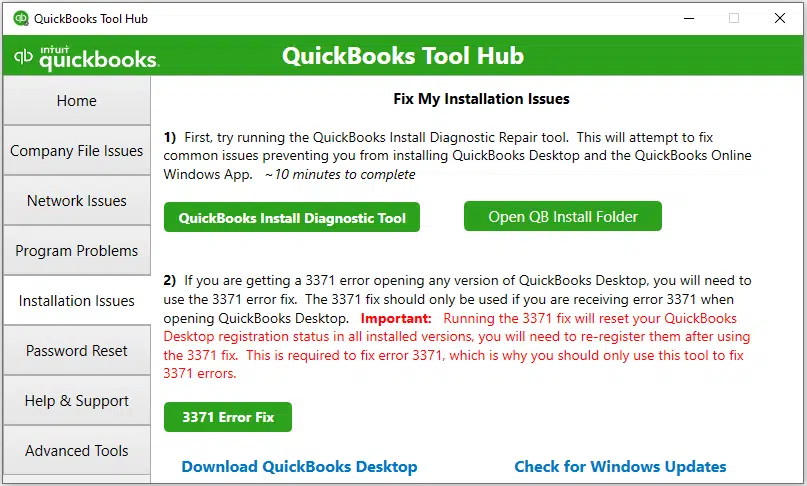
Table of Contents
What was the QuickBooks Component Repair Tool?
The QuickBooks Component Repair Tool was a free utility from Intuit designed to fix installation issues caused by damaged Windows components. It automatically scanned components like the .NET Framework, MSXML, and Visual C++ and repaired them, without needing any special configuration.
The tool was commonly used for fixing errors such as:
- QuickBooks Desktop installation errors
- Microsoft .NET Framework related issues
- Microsoft MSXML related issues
- Microsoft Visual C++ related issues
- Error code 1935
- QuickBooks error code 1603
- Error code 1402
- Error code 1904
Where is the Component Repair Tool now?
You no longer need to hunt for a separate download. Intuit merged the Component Repair Tool, the Install Diagnostic Tool, File Doctor, and other utilities into one program: the QuickBooks Tool Hub. The component-repair functionality is now the QuickBooks Install Diagnostic Tool, found on the Tool Hub's Installation Issues tab.
Method 1: Run the QuickBooks Install Diagnostic Tool from the Tool Hub
This is the modern replacement for the old component repair tool, and it fixes the same class of installation errors:
- Close QuickBooks and all other running programs.
- Download the latest QuickBooks Tool Hub (version 1.6.0.8, current as of late 2026) from Intuit's official support article and save it where you can access it easily.
- Open QuickBooksToolHub.exe and follow the on-screen instructions to install it. Agree to the terms and conditions.
- Double-click the QuickBooks Tool Hub icon on your desktop to open it.

- Go to the Installation Issues tab.
- Select QuickBooks Install Diagnostic Tool. The scan can take up to 20 minutes — let it finish.
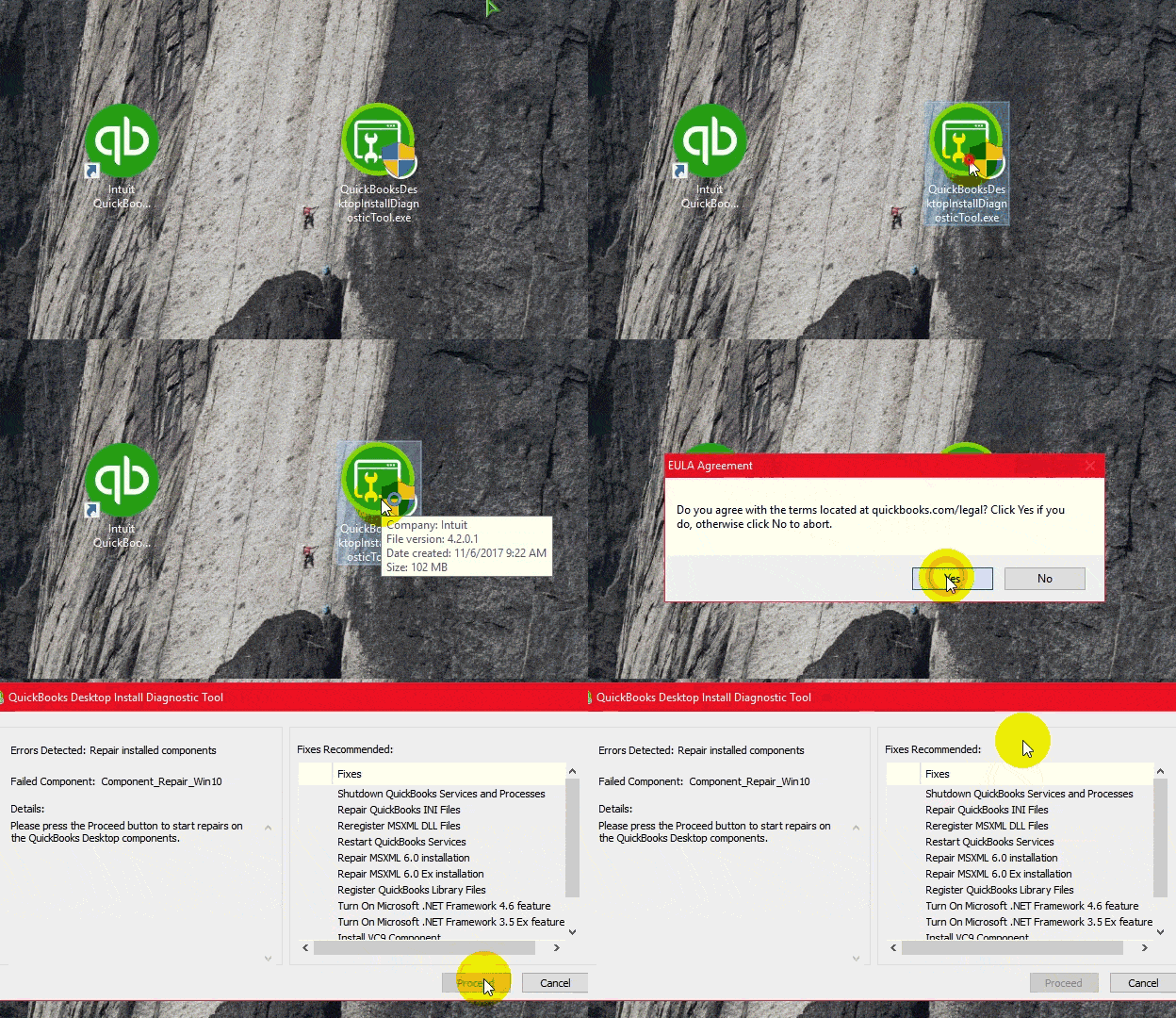
- When the tool finishes, restart your computer and try installing QuickBooks Desktop again.
Method 2: Update Windows
If the diagnostic tool does not resolve the issue, an outdated Windows installation may be the cause:
- Press the Windows key and type Windows Update.
- Click Check for updates.
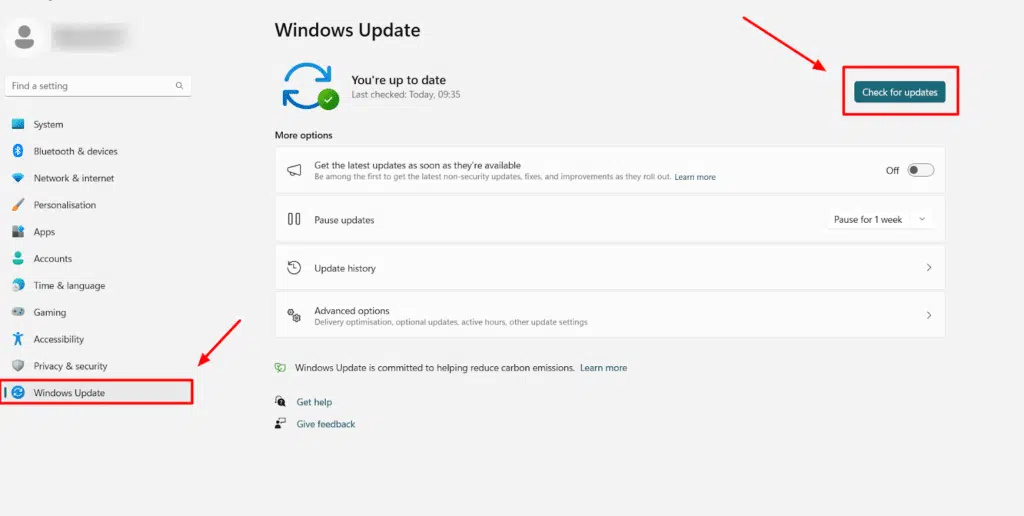
- Download and install all available updates.
- Restart your system once the update process completes.
- Try installing QuickBooks Desktop again.
Methods to fix installation errors manually (if the tool does not work)
If the Install Diagnostic Tool fails and the issue continues, you can manually repair the Microsoft components. This involves:
- Repairing the .NET Framework.
- Re-registering Microsoft MSXML.
Method 3: Repair the .NET Framework
QuickBooks Desktop uses the .NET Framework to connect with applications that need an internet connection. If this Microsoft component is damaged or corrupted, you may see error codes such as Error 1603, Error 1722, Error 1903, and Error 1904.
- Open the Control Panel and go to Programs and Features.
- Select Turn Windows features on or off.
- Find .NET Framework in the list, uncheck it, click OK, and restart your computer.
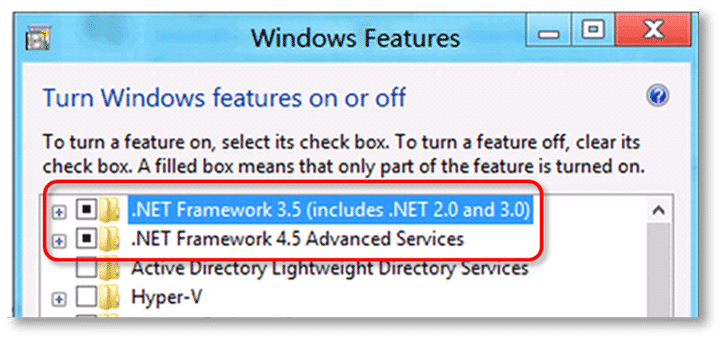
- After restarting, go back to Turn Windows features on or off, check .NET Framework again, click OK, and restart once more. This reinstalls the component cleanly.
- Try installing QuickBooks Desktop again.
Method 4: Re-register Microsoft MSXML
The QuickBooks installation can fail when it comes across a damaged Microsoft MSXML component:
- Press Windows + R, type cmd, and press Ctrl + Shift + Enter to open Command Prompt as administrator.
- Type
regsvr32 MSXML6.dlland press Enter to re-register the MSXML library. - Restart your computer and try the QuickBooks installation again.
Note: These manual steps fix the most common component issues, but they cannot fix everything. If installation errors continue, a clean install of QuickBooks Desktop or professional help may be needed. If install errors keep blocking you, our error troubleshooting experts can take it from here.
Conclusion!
This brings us to the end of this post. We hope the information shared above helps you make the best use of the component repair functionality — now a part of the QuickBooks Tool Hub. If something is still bothering you, or you face any difficulty at any point, get in touch with our U.S.-based accounting professionals. For further assistance, call us. Our XpertBooks Pro consulting team will be happy to help you in a single call.
FAQs
Is the Component Repair Tool still available as a separate download?
No. Intuit retired the standalone Component Repair Tool (QBInstall_Tool_v2.exe). Its repair functions are now part of the free QuickBooks Tool Hub, under Installation Issues → QuickBooks Install Diagnostic Tool.
Is the QuickBooks Tool Hub free?
Yes. The QuickBooks Tool Hub is completely free. Always download it from Intuit's official support article, never from third-party download sites.
How often should I run these repair tools?
Only when you encounter installation errors related to damaged Windows components. You do not need to run them regularly.
What is the difference between File Doctor and the Install Diagnostic Tool?
QuickBooks File Doctor fixes company file and network-related errors, while the Install Diagnostic Tool (the old component repair functionality) fixes installation errors caused by damaged Windows components like .NET Framework and MSXML.
Related Articles:
Fix QuickBooks Error 1321: Insufficient Privileges to Modify File