The 1099 threshold just changed for the first time since 1954. Here's the deal if you pay contractors or freelancers: $600 is out, $2,000 is in — but only for money you pay in 2026. Mix up the years and you'll file the wrong forms. There's no real downside to getting this right now, in October, while there's still time.
Quick version: 2026 payments → $2,000 threshold. 2025 payments (the ones you file this January) → still $600. And get those W-9s collected now, because a missing W-9 past $2,000 means 24% backup withholding. That's not a typo.
What Changed, Exactly?
The One Big Beautiful Bill Act (signed July 2025) did four things to 1099 thresholds:
1099-NEC (contractors, freelancers): $600 → $2,000 per person, per year.
1099-MISC (rent, prizes, other income): $600 → $2,000 per person, per year.
Royalties (MISC Box 2): still $10. Untouched.
1099-K (PayPal, Stripe, etc.): back to $20,000 and 200 transactions. The whole phase-in plan — $5,000, then $2,500, then $600 — is dead, retroactive to 2022.
Three things people get wrong about the $2,000 number:
It's per person, per year — not per invoice. Ten $250 invoices to one designer = $2,500. That designer gets a 1099. Simple math, easy to miss.
No 1099 ≠ no tax. Pay a cleaner $1,500, no form goes out. That $1,500 is still taxable income on their return. The threshold only decides whether you have to file the paperwork.
It won't stay $2,000 forever. Inflation adjustments kick in starting 2027.
One more: Zelle doesn't exempt anyone. Still need the W-9, still file the 1099-NEC. The payment app doesn't change the rule.
This is the part that'll cause the most headaches this January, so let's nail it down.
The 1099s you file in early 2026 cover money you paid in 2025. Old rule applies: $600. The shiny new $2,000 threshold? That's for payments made on or after January 1, 2026 — the ones you report in early 2027.
Two thresholds, one filing season. Get them crossed and you're either doing pointless paperwork or skipping forms the IRS wants. Neither is fun.
Stick this on your monitor: 2025 money = $600. 2026 money = $2,000. Done.
The 24% Backup Withholding Trap
Here's the expensive part. Congress moved the backup withholding threshold to $2,000 too.
Say your contractor crosses $2,000 in 2026 and you've got no valid W-9 on file. From that payment on, you're required to hold back 24% of everything you pay them and send it to the IRS. Not optional. Required.
Think about that for a second. One missing piece of paper, and a quarter of every invoice goes to the IRS instead of your contractor. Your contractor won't love you for it either.
The fix is free: get the W-9 before you pay, not after. Do it this month and this problem never exists.
Your October Checklist (Don't Wait Till January)
October is W-9 season. The firms that breeze through January are doing this work right now. Here's the order:
Step 1: Pull your 2026 vendor list
QuickBooks Desktop → Vendors > Vendor Center. Look at everyone you've paid this year. Flag whoever's near $2,000 already, plus anyone on pace to cross it by December. That list is the whole project.
Step 2: Chase the missing W-9s this week
Everyone flagged without a W-9 on file gets an email now. Keep it short:
"Hi [Name], closing out our year-end tax paperwork — please fill out the attached W-9 and send it back by [date]. We need it for 1099 reporting. Thanks!"
Heads up: if someone won't give you a W-9 and they're past $2,000, think twice before cutting the next check. Without that form, the backup withholding bill lands on you.
Step 3: Fix the vendor setup in QuickBooks
The step everyone skips — which is why January turns into chaos. For each contractor: double-click the vendor, open the Tax Settings tab, and check two things. "Vendor eligible for 1099" must be ticked. And the Tax ID has to match the W-9 exactly — one wrong digit and you're looking at an IRS mismatch notice in March.
Step 4: Rehearse the 1099 wizard
Before the holidays, go to Vendors > Print/E-file 1099s and run it once without filing. It'll show you exactly who crosses the threshold and flag every missing Tax ID. Finding gaps in November beats finding them on January 30th. You're all set from there.
Federal rule is simple again: $20,000 and 200+ transactions. One wrinkle — a handful of states (Massachusetts, Maryland, Virginia, Vermont, Montana, North Carolina, DC, New Jersey, Rhode Island) set their own lower 1099-K floors. Operating in one of those? Check the state rule separately.
Conclusion!
Good news: fewer 1099s for most small businesses. The catch: the W-9 habit matters more than ever, because the 24% backup withholding line moved to $2,000 right along with the threshold. Collect the forms in October, keep your QuickBooks vendor mapping clean, rehearse the wizard early — and January will be the most boring month of your year.
Rather hand the whole thing off? W-9 tracking, vendor mapping, filing, e-filing — our US-based team runs the full 1099 season for small businesses every year.
FAQs
Which threshold for the 1099s I file in January 2026?
$600 — the old one. Those forms cover 2025 payments. The $2,000 rule starts with payments made on or after January 1, 2026.
Contractor earned $1,200 — no 1099, so no tax?
Nope. The threshold only decides if you issue the form. They still report the $1,200.
When does 24% backup withholding kick in?
Someone crosses $2,000 in 2026 payments from you + no valid W-9 on file = 24% off every payment after that.
Zelle payments exempt?
No. Same rules, same W-9, same 1099-NEC.
Is the 1099-K $600 threshold really gone?
Gone. Back to $20,000 and 200+ transactions, retroactive to 2022.
September is a rough month to be running payroll. The quarter is closing, Form 941 prep is right around the corner, and the last thing anybody needs is a tax table that's quietly out of date. That's exactly the risk sitting in a lot of QuickBooks Desktop files right now, because Intuit released QuickBooks Payroll Update 22616 on September 22, 2026, and this one carries real changes for Maine and Maryland employers.
If your team skipped it, or the download stalled halfway and nobody noticed, your next payroll could calculate Maine withholding from old tables. In this post, we'll walk through what the update actually contains, how to install it properly, how to confirm it took effect, and what to do if it refuses to cooperate. Keep scrolling till the end, because the verification step is the part most people skip, and it's the part that matters most.
What is QuickBooks Payroll Update 22616?
Payroll Update 22616 is the September 2026 tax-table release for QuickBooks Desktop Payroll. Every payroll update refreshes the data QuickBooks uses to calculate federal and state payroll taxes: withholding tables, payroll items, and the figures that eventually flow into your tax forms. When a state changes its rules mid-year, that change reaches your paychecks only through an update like this one.
Two things are worth knowing up front. First, you need an active QuickBooks Payroll subscription to receive tax-table updates at all. If the subscription has lapsed, the update simply won't arrive, no matter how many times you click download. Second, Intuit notes there are no E-File and E-Pay changes in this release, so your filing and payment workflows stay exactly as they were. The changes here are about calculation, not filing.
What Changed in QuickBooks Payroll Update 22616?
New Maine Withholding Tables
The headline change affects Maine. Update 22616 includes new Maine withholding tables effective August 1, 2026, with revised standard deductions and a high-income surcharge built into the tables. Practically speaking, that means a Maine employee's state withholding can change from the first payroll you run after installing the update, slightly for most people, and more noticeably for higher earners.
One caution here. The tables are effective August 1, but they only reach your company file when you install the update. If you've already run August or September payrolls on the old tables, don't panic, and don't start editing old paychecks. Note the difference, and let your quarter-end reconciliation and the state's own guidance drive any correction. What matters most is that payrolls from now on use the current tables.
Maryland FAMLI Payroll Items
For Maryland, the update adds Family and Medical Leave Insurance (FAMLI) payroll items to the 2026 tax tables. Maryland's FAMLI program is the state's paid family and medical leave system, and as it moves toward contribution collection, QuickBooks needs those payroll items in place so the deduction can be tracked correctly when it applies to your business.
Seeing the new items in your payroll item list doesn't mean money starts moving on its own. Review the items, confirm how they apply to your company, since employer size and your FAMLI plan setup affect your obligations, and check the Maryland Department of Labor's FAMLI guidance for your registration and contribution duties. The update gives you the tools; the setup decisions are still yours.
What Didn't Change
Federal tables are untouched in this release, and as mentioned above, there are no E-File or E-Pay updates. If a state other than Maine or Maryland is your concern, this release doesn't change your calculations. Still, staying current is the right habit, because the next release might be the one that matters to you.
How to Download and Install QuickBooks Payroll Update 22616
Work through these steps in order. Most failed updates trace back to one of them being skipped.
Back up your company file first. Updates occasionally collide with a damaged file, and a backup turns that from a crisis into an inconvenience.
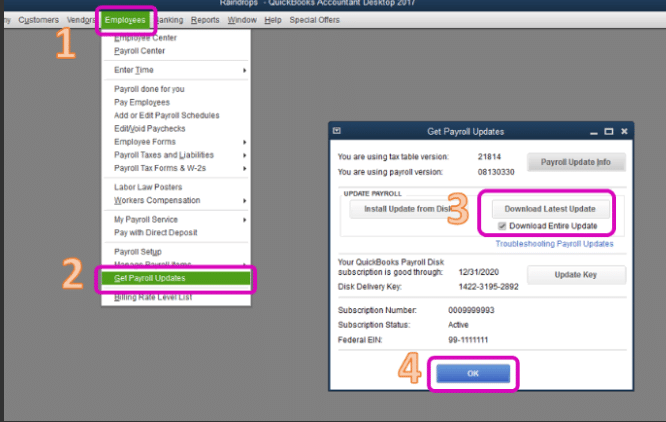
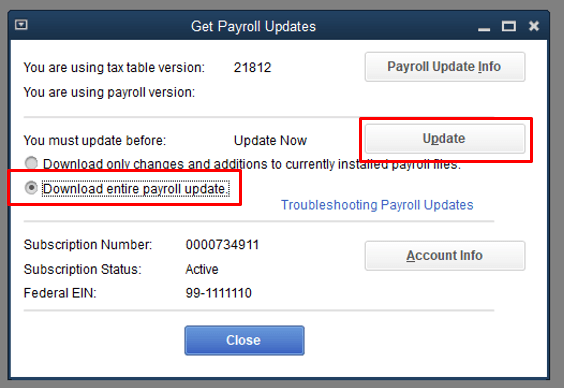
Go to Employees, then Get Payroll Updates.
Choose Download Entire Update rather than a partial refresh. A full download replaces the whole tax table, which avoids half-applied states.
Click Update and let it finish completely. Don't close QuickBooks mid-download, even if it looks stuck for a minute.
When it completes, close and reopen QuickBooks so the new tables load cleanly.
If you run QuickBooks in multi-user mode, make sure everyone else is logged out during the update. An open session elsewhere can block the files the update needs to replace.
If the download errors out, or the version doesn't change afterward, jump to the troubleshooting section below.
How to Verify the Update Installed Correctly
A completed download bar is not proof. Verify the update like this:
Go to Employees, then Get Payroll Updates.
Click Payroll Update Info. This window shows the tax table version currently installed, along with a summary of what the latest release contains.
Confirm the installed version reflects 22616, or a newer release if one has shipped since.
While you're there, spot-check one Maine employee's next paycheck calculation against expectations, and for Maryland, open Lists, then Payroll Item List, and confirm the new FAMLI items are present. Two minutes of checking now beats a quarter-end surprise, especially if you've ever dealt with QuickBooks calculating payroll taxes incorrectly after a missed update.
What to Do if QuickBooks Payroll Update 22616 Is Stuck or Won't Install
This is where most people lose an afternoon, so work through the list methodically instead of retrying the same download again and again.
Check the subscription. An expired or inactive payroll subscription silently blocks tax-table updates. Renew it first, then retry.
Run QuickBooks as administrator. Right-click the QuickBooks icon, choose Run as administrator, and then try the update again. Windows permissions are a more common culprit than people expect.
Update QuickBooks itself first. An outdated program release can refuse a newer tax table. Bring the QuickBooks release current, restart, and then retry the payroll update.
Check your security software. Firewalls and antivirus tools sometimes quarantine the update's downloaded files. A temporary exception for QuickBooks during the update usually settles it.
Watch for PS-series errors. Errors like PS032, PS033, or PS077 during a payroll update point to damaged payroll components or a damaged company file. They're a different problem from a slow download, and each one has its own fix path.
If updates fail on this machine regularly rather than just this once, the broader walkthrough of QuickBooks Desktop payroll update errors covers the deeper causes, and the PS033 fix guide handles that specific error step by step. You may also read: QuickBooks Payroll Error PS033.
Quarter-End Checks Before You Close September
Since this update landed about a week before quarter-end, add these three quick checks to your September close:
Confirm the installed version one last time through Payroll Update Info, so Q3's final payrolls all ran on current tables.
Review Maine liabilities. If any Q3 payrolls ran on the old Maine tables, flag the variance now so it doesn't ambush your Form 941 and state reconciliation work.
Review the Maryland FAMLI items and your registration status, so you're set up before contributions apply to your business instead of scrambling afterward.
None of this is glamorous, but quarter-end is exactly when small payroll drifts turn into amended returns.
Conclusion!
Summing up, we covered the QuickBooks Payroll Update 22616 release in detail: the new Maine withholding tables, the Maryland FAMLI payroll items it adds, and what it leaves unchanged. We hope the steps shared above have helped you install the update and verify your tax tables with confidence before the quarter closes. If the update still won't install or you run into any difficulty while following the steps, consider consulting a qualified and experienced QuickBooks professional for further guidance.
FAQs
How do I know if I already have QuickBooks Payroll Update 22616?
Go to Employees, then Get Payroll Updates, then Payroll Update Info. The window shows your installed tax table version and what the current release includes. If it shows 22616 or higher, you're all set.
Do I need this update if I don't have Maine or Maryland employees?
Your calculations won't change with this release, but installing it keeps your tax table current and avoids a backlog of skipped releases. There's no real downside to staying up to date.
The Maine tables are effective August 1, but I installed the update in late September. What about my August payrolls?
The update only affects payrolls calculated after installation. Don't rewrite history by editing old paychecks unless Maine's guidance or your accountant calls for it. Document the timing and reconcile it at quarter-end or year-end instead.
Does QuickBooks Payroll Update 22616 change how I e-file or e-pay?
No. Intuit notes this release contains no E-File or E-Pay changes, so your filing and payment process stays exactly the same.
My payroll update keeps failing partway. Where do I start?
Confirm your payroll subscription is active, run QuickBooks as administrator, and choose Download Entire Update. If it still fails or throws a PS-series error, work through the troubleshooting section of this post step by step.
You may also like:
If payroll updates keep failing on your system, this guide to fixing QuickBooks Payroll Update Error 15106 walks through one of the most common download errors in detail.