
QuickBooks Banking Error 106 means QuickBooks can't find your account on your bank's website — usually because the account was closed, renamed, or changed on the bank's side. Start by logging into your bank's website directly to check the account's status, then update your credentials or reconnect the account in the Bank Feeds Center.
Picture this: you're doing your morning bookkeeping, you open the Bank Feeds Center, and instead of new transactions there's an error message. Error 106. Your bank feed is dead in the water.
Before you panic — no, your data isn't gone. But unlike some banking errors that clear up on their own, Error 106 is QuickBooks telling you something changed about your account itself. It's worth paying attention to.
Here's what's going on and how to fix it.
What is QuickBooks Banking Error 106?
Banking Error 106 pops up when QuickBooks tries to connect to your bank's website and can't find the account it's looking for. QuickBooks reaches out, the bank looks around, and essentially says: "I don't have an account by that name anymore."
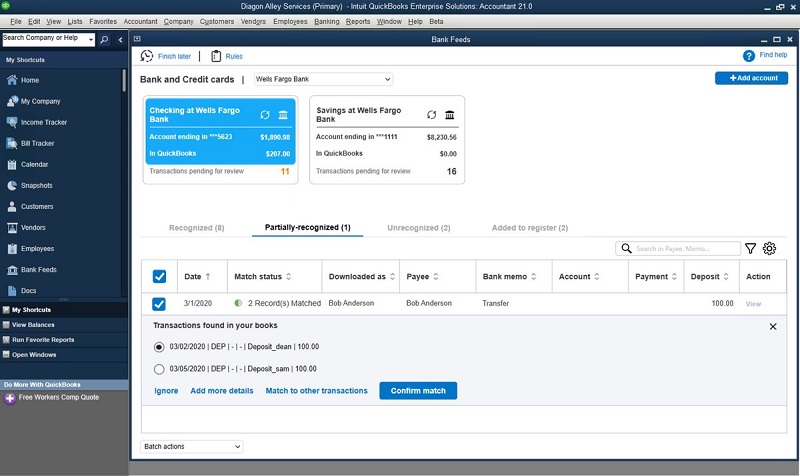
This lives in the Bank Feeds Center in QuickBooks Desktop. While it lasts, no new transactions download for that account. Your existing data is untouched — the error only blocks *new* downloads.
Why does Banking Error 106 happen?
The usual suspects:
- Your bank account was closed. This is the number one cause. If you closed the account (or the bank closed it), QuickBooks still tries to connect to it and gets nowhere.
- The account was renamed or renumbered. Banks do this more often than you'd think — especially after mergers, system upgrades, or when they consolidate account types.
- The bank moved the account to a new server or system. Same account, new home. QuickBooks doesn't know about the move.
- Your bank login credentials changed. New password, new username — QuickBooks is still knocking with the old key.
- The bank updated its website. New security requirements, a new login page, a redesigned site — anything that changes how QuickBooks signs in can trigger this.
- A temporary connection glitch. Less common for 106 specifically, but it happens.
Notice the theme: in most cases, the change happened on the *bank's* side, not yours. That's why the first step is always to check with the bank.
How do you know it’s Error 106?
- The code 106 appears in the Bank Feeds Center when you sync.
- New transactions stop downloading for that account.
- You may see a message saying QuickBooks can't find your account on your bank's website.
- Everything else in QuickBooks works fine — it's just this one feed that's stuck.
Solutions that actually fix Banking Error 106
Start at the top. Most people never make it past Solution 2.
Solution 1: Check your bank account’s status directly
Since 106 usually means the account itself changed, start here — not in QuickBooks.
- Open your browser and log in to your bank's website directly.
- Look for the account that's failing in QuickBooks. Is it still there?
- If the account is closed, merged, or renamed — there's your answer. QuickBooks can't connect to an account that no longer exists.
- Check for any notices about account changes, mergers, or required actions. Banks don't always email you about these.
- If the account looks fine and active, log out and move to Solution 2.
If the account *is* closed: you'll want to disconnect it from QuickBooks so it stops throwing errors. Go to Banking > Bank Feeds > Bank Feeds Center, select the account, and deactivate the feed. If you've opened a replacement account, set up a fresh bank feed for it with Banking > Bank Feeds > Set Up Bank Feed for an Account.
Solution 2: Update your bank login credentials
If the account is open and active, the next most likely culprit is credentials.
- Did you change your bank password or username recently? Even a small change breaks the feed.
- In QuickBooks, go to Banking > Bank Feeds > Bank Feeds Center and sync the account. Watch for a prompt asking you to re-enter your sign-in info.
- Enter your current credentials carefully. Make sure you're using the exact username and password that work on the bank's website.
- Complete any multi-factor authentication or security prompts the bank throws at you — QuickBooks can't skip those.
Solution 3: Deactivate and reconnect the account
If your credentials are correct but the error persists, the connection itself may be stale — especially if the bank moved your account behind the scenes.
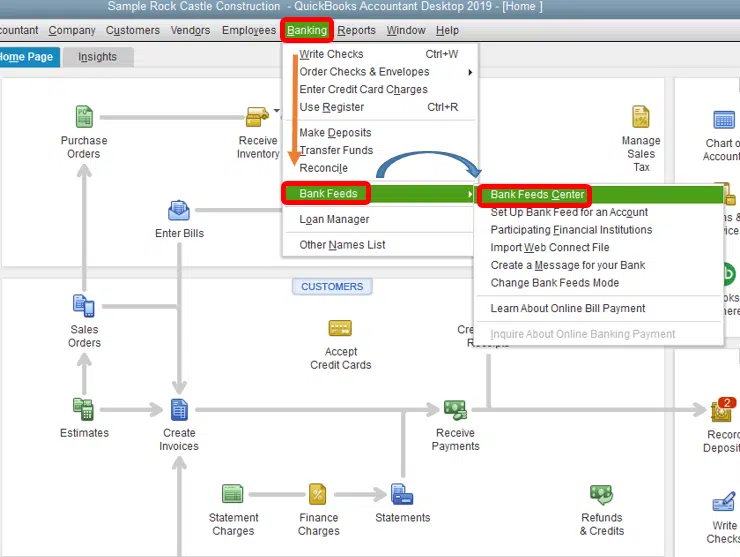
- Go to Banking > Bank Feeds > Bank Feeds Center.
- Select the problem account and deactivate bank feeds for it. (Relax — this doesn't delete any transactions already in QuickBooks. It just stops the feed.)
- Close the Bank Feeds Center.
- Go to Banking > Bank Feeds > Set Up Bank Feed for an Account and set up the account again from scratch.
- Follow the prompts, sign in with your current bank credentials, and link the account to the right register.
- Sync one more time to confirm the error is gone.

Solution 4: Look for messages or actions required on the bank’s website
Banks love putting "action required" banners in places nobody looks.
- Log in to your bank's website and check for any alerts, pop-ups, or messages — new terms of service, security verification, account confirmations.
- Complete anything that needs a response. QuickBooks can't log in past an unacknowledged message.
- Once you've cleared everything, sync the account in QuickBooks again.
Solution 5: Rule out the usual technical suspects
If nothing above worked, cover the basics:
- Confirm your internet connection is actually working.
- Temporarily disable any VPN — VPNs can make the bank think you're signing in from a strange location.
- Update QuickBooks Desktop: go to Help > Update QuickBooks Desktop, click Update Now, select Get Updates, and restart QuickBooks when it's done. Banks update their systems regularly, and older QuickBooks versions sometimes can't keep up.
- Check that your firewall or antivirus isn't blocking QuickBooks from reaching the internet.
- Wait 24 hours and try again. Sometimes it's genuinely a temporary issue on the bank's servers.
If you're seeing other bank feed codes alongside this one, you may also read: /troubleshoot-quickbooks-banking-error-185/
Conclusion!
That brings us to the end of the troubleshooting methods for QuickBooks Banking Error 106. We hope the solutions explained above helped you understand the possible cause of the error and get your bank feeds downloading again. If the error still appears or you run into any difficulty while following the steps, consider consulting a qualified and experienced QuickBooks professional for further assistance.
FAQs
What’s the difference between Error 106 and Error 105?
Error 105 means QuickBooks can't *reach* your bank's website at all — usually maintenance or an outage. Error 106 means QuickBooks *reached* the bank but can't find your *account* there. Different problem, different fix. With 106, the account itself is the issue.
My account is closed. Do I have to do anything in QuickBooks?
Yes. Disconnect or deactivate the bank feed for the closed account so it stops erroring every time you sync. Your existing transactions stay in QuickBooks — nothing is deleted. If you opened a new account, set up a fresh feed for it.
Will I lose transactions because of Error 106?
No. The error only blocks new downloads. Everything already recorded in QuickBooks is safe, and once the connection is fixed, any missed transactions download normally.
I didn’t close my account and my credentials work. Now what?
The bank may have renamed, renumbered, or moved your account on their end — sometimes without telling you clearly. Call the bank and ask specifically whether anything changed about the account's online profile. If they confirm it's all the same, try Solution 3 (deactivate and reconnect) or reach out for help.
You may also like:
fix QuickBooks banking error 324